
NetBee Widgets: The Fast Track to Enhancing Your Website
If you want to make your website more functional and engaging without custom coding cycles, widgets are the ideal solution. Furthermore, NetBee Widgets offers a comprehensive collection of ready-to-use, plug-and-play components. Consequently, you can add high-impact sections to your website quickly and effortlessly.
On the NetBee Widgets page, you will find diverse modules designed for modern website requirements. For example, the library includes news feeds, video players, catalogs, galleries, and utility tools. Therefore, instead of building elements from scratch, you can simply select the right widget and elevate your user experience immediately.
Why Are Widgets Essential for Your Website?
Widgets serve as pre-built, modular components. Specifically, they are fast to deploy and simple to customize according to your visual branding. In addition, they provide advanced functionality that would otherwise require significant time and development costs.
As a result, your website benefits from several key advantages:
- Enhanced visual appeal: Clean, modern designs optimized for all screen sizes.
- Improved user experience (UX): Seamless and intuitive navigation for every visitor.
- Higher user engagement: Longer visit durations along with increased interactions and page views.
- Rapid content updates: Easy data and campaign management without requiring ongoing technical support.
Popular and Practical NetBee Widgets
Depending on your business objectives, you can easily choose the most suitable widget:
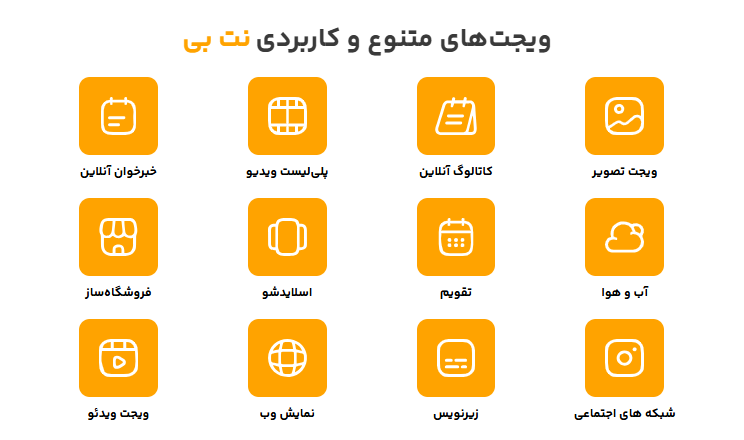
- Online News Feed: Display the latest company updates and industry news automatically.
- Video Playlist: Organize and present your multimedia content in a professional format.
- Video Widget: Showcase featured videos using a clean and focused interface.
- Online Catalog: Present your products, services, or portfolios effectively.
- Image Widget: Display promotional banners and visual assets.
- Slideshow: Capture visitor attention on your homepage using dynamic content.
- Store Builder: Add e-commerce modules and product listings seamlessly.
- Reservation System: Enable direct bookings, appointments, and service requests.
- Calendar: Present upcoming events, schedules, and deadlines clearly.
- Weather Widget: Display real-time weather information for specific locations.
- Social Media Feed: Connect and showcase your live social network updates.
- Web View: Embed external web pages and specialized tools directly into your layout.
How to Choose the Right Widget for Your Goals
To select the best component, you should first identify your primary objective:
- Information & Content: Choose the News Feed, Catalog, Image, or Slideshow widgets.
- User Engagement: Implement the Reservation, Social Media, or Video widgets.
- Business & Sales: Deploy the Store Builder or Online Catalog to showcase offerings.
- Daily Utilities: Utilize the Calendar or Weather widgets for practical daily information.
Conclusion
NetBee Widgets provide a fast, reliable, and scalable approach to expanding website functionality without continuous programming overhead. Ultimately, implementing the right widgets ensures a professional digital presence while delivering an exceptional experience to your visitors.