
NetBee TV: Simple, Centralized TV Channel Management
Televisions in hotel lobbies, waiting rooms, sports facilities, and office reception areas are part of the visitor experience. Selecting relevant channels and keeping them organized helps match the available content to the needs of each space. However, managing several different channel lists can become fragmented and time-consuming.
NetBee TV is a web-based panel for managing TV channels and their display configurations. It allows you to create dedicated profiles for different purposes, add the channels you need, and organize their order through a unified Persian-language interface.
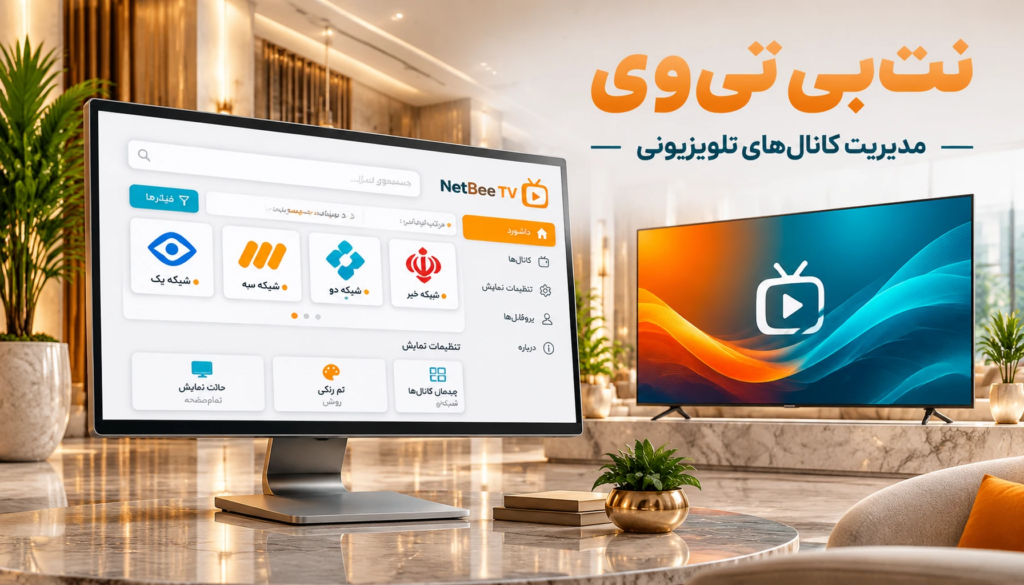
Featured image caption: NetBee TV — organized management of TV channel lists and display configurations.
What Is NetBee TV?
NetBee TV is a tool for creating and managing TV channel lists. Channels and their associated settings are stored in separate configuration profiles.
Each profile can have its own name, channel list, and display settings. For example, you can create a profile called “Lobby” and add channels suited to the reception area. You can then create another profile for a waiting room or sports area.
Within the panel, these profiles are referred to as “configurations.” A configuration is a collection of channels and settings saved and managed together.
Why Does TV Channel Management Matter?
Different areas of a facility have different needs. Channels suitable for a gym may not be appropriate for a hotel lobby or waiting room. Channel priorities and streaming sources may also change over time.
A dedicated management panel helps you:
- Maintain separate channel lists for different purposes.
- Place frequently used channels at the top of the list.
- Organize channel names, images, and groups.
- Update existing configurations as your requirements change.
- Keep configurations in one place rather than maintaining scattered records.
NetBee TV focuses on these needs to make channel organization easier.
NetBee TV Features
Create Dedicated TV Profiles
NetBee TV allows you to create multiple independent configurations and give each one a clear name. Names such as “Reception Lobby,” “Waiting Room,” or “Sports Channels” make each profile’s purpose easy to identify from the dashboard.
This is useful for facilities that need different channel lists rather than a single shared configuration.
Add and Edit TV Channels
You can define the channels required for each profile. Channel information includes a title, streaming address, image, and group.
When a channel’s information changes, you can update it. You can also add new channels or remove entries that are no longer needed from a particular profile.
This makes it possible to review and maintain channel lists as the facility’s requirements evolve.
Reorder Channels Easily
Channel order affects how easily users can find what they need. Frequently used channels, or those most relevant to a particular space, can be placed near the top of the list.
NetBee TV supports drag-and-drop channel ordering. Simply move a channel to the desired position and save the new order without rebuilding the list.
Add Channel Images and Groups
A channel image or logo makes entries easier to recognize. NetBee TV allows you to select an image for each channel or upload a new one.
You can also assign a group to each channel, such as news, sports, education, or entertainment. This information helps keep channel lists organized.
Configure Display Layout and Position
Alongside channel list management, each profile includes options for display layout and position.
These settings are saved with the configuration for use in a compatible playback environment. The final appearance depends on the capabilities of the playback system and how it uses those settings.
View Configuration Summaries on the Dashboard
The NetBee TV dashboard displays saved configurations as cards. Each card shows the profile name, channel count, and a summary of its display settings.
You can also access configuration management, export options, and deletion tools from this area. This gives you an overview of existing profiles without opening each one individually.
Export Configurations
Once a channel list is ready, you can obtain its configuration output for use in a compatible environment.
This connects channel management with the playback setup without requiring you to enter every channel’s information again.
Who Can Use NetBee TV?
Hotels and Accommodation Facilities
Hotels may need different channel lists for different spaces. NetBee TV allows these lists to be created and maintained as separate profiles.
For example, a lobby configuration can be managed independently from a list intended for another public area.
Organizations and Office Facilities
Organizations can define specific TV channel lists for reception areas, shared spaces, and waiting rooms.
Separate profiles help keep each use case organized and allow changes to be made within the relevant configuration.
Hospitals and Healthcare Centers
Healthcare facilities can prepare channel lists that align with their waiting room requirements and internal policies. Channels and their order can be updated when necessary.
This use case concerns preparing and maintaining channel lists—not producing or supplying television content.
Gyms and Sports Facilities
Sports facilities can create profiles focused on relevant channels and place frequently used networks at the top of the list.
Facilities with several different spaces can also maintain separate lists for different purposes.
Multi-Department and Multi-Branch Organizations
For organizations that need several configurations, independent profiles help keep settings clearly separated and organized.
However, creating multiple profiles does not mean directly controlling branches or devices. Using each configuration requires compatible playback infrastructure.
How to Use NetBee TV
Creating a TV profile follows a straightforward process.
1. Create a New Configuration
From the dashboard, select the option to add a new configuration.
2. Choose a Clear Name
Enter a name that describes the configuration’s purpose. Names such as “Lobby TV” or “Waiting Room” are particularly useful when managing several profiles.
3. Select Display Settings
Choose the required display layout and position so they are saved with the rest of the profile.
4. Add Channels
Define the channels you need and enter their details, including the name, streaming address, image, and group.
5. Organize the List
Move channels into your preferred order. Before saving, review the channel titles and list sequence.
6. Save the Configuration
Save the profile once the information is complete. You can then access it from the dashboard, edit its settings, or obtain the required configuration output.
A Persian-Language Interface for Clearer Management
NetBee TV has a Persian-language, right-to-left interface. Labels, forms, and messages are displayed in Persian to make the workflow easier for Persian-speaking users.
General settings and channel management are presented in separate sections. This allows users to define the profile’s main details before working on its channel list.
Configuration summaries on the dashboard and a choice of light or dark themes are also part of the interface.
Channel Management vs. TV Device Control
When choosing a solution, it is important to distinguish between managing channel lists and controlling television devices.
The version of NetBee TV described here focuses on creating profiles, adding and organizing channels, and maintaining display configurations. Features such as switching televisions on or off, monitoring device connectivity, or reporting viewing activity are not among the capabilities presented for this panel.
The product is also not, by itself, a source of TV channels or a complete television broadcasting system. Content playback requires valid streaming sources and a compatible playback environment.
Frequently Asked Questions
What does NetBee TV do?
NetBee TV is a TV channel management panel. It allows you to create profiles, add and reorder channels, and save display settings.
Can I create multiple channel lists?
Yes. You can create independent profiles, each with its own channel list and settings.
Can I edit a configuration after saving it?
Yes. You can open the configuration management section and update channel information, channel order, or profile settings.
How do I change the channel order?
In the channel management section, drag and drop a channel into the desired position, then save the new order.
Can I add a channel logo?
Yes. You can select an image for each channel or upload a new one.
Is NetBee TV suitable for hotels and organizations?
The panel can be used to organize TV channel lists for hotels, organizations, healthcare centers, and sports facilities. Using those configurations for playback requires a compatible system.
Does the panel directly control televisions?
Direct device controls, such as switching televisions on or off or monitoring their connection status, are not among the features presented. The product focuses on channel and configuration management.
Conclusion: Keep Your TV Channel Lists Organized
TV channel management becomes easier when lists and settings follow a clear structure. NetBee TV provides a unified environment for creating independent profiles, adding and editing channels, organizing their order, and exporting configurations.
If your facility needs several clearly defined, editable TV channel lists, NetBee TV can handle configuration management alongside a compatible playback system.
Visit the NetBee TV panel to explore the interface and create a configuration.